

Worked example
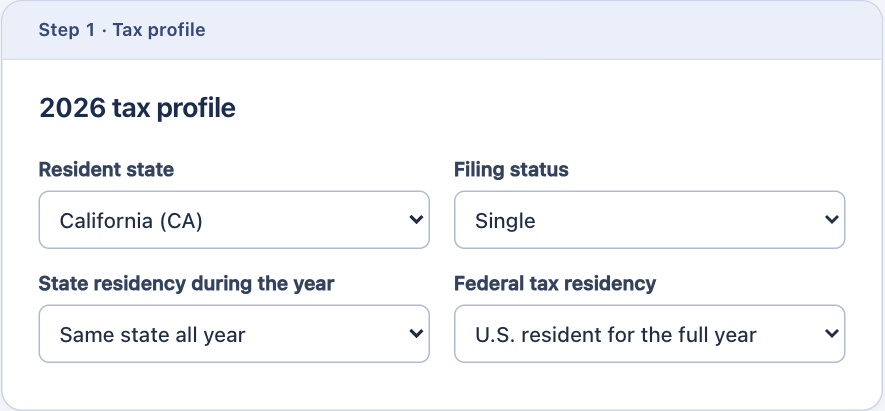
For this example, you’re single, lived in California all year, and were a U.S. resident for federal tax purposes all year. Have your filing status and any move dates handy.
Walkthrough
-
Choose your state and filing status
In Tax profile, choose California as your home state and Single as your filing status. If you picked a state on the home page, check the selection here.
 Open full-size image ↗
The first two fields identify the state and filing status for this estimate. -
Answer both residency questions
For this example, choose Same state all year and U.S. resident for the full year. If you moved or your federal residency changed, choose the answers that match your dates.
-
Add out-of-state work if it applies
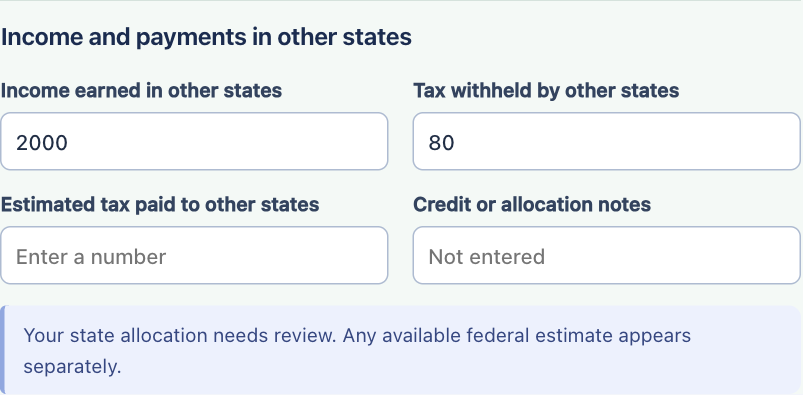
If you also worked on a project in Oregon, open Multistate income & residency. Enter Oregon income, withholding, and estimated payments in their separate fields.
 Open full-size image ↗
The amount earned in the other state and the amount withheld go in different fields. -
Continue to income
Review the four choices, then continue to Income & expenses. If a field is flagged, complete it here. You can save a supplemental draft while you look up missing records.
This guide opens in its own tab. Close it to keep working in the tab where you started; your entries stay there.