

Worked example
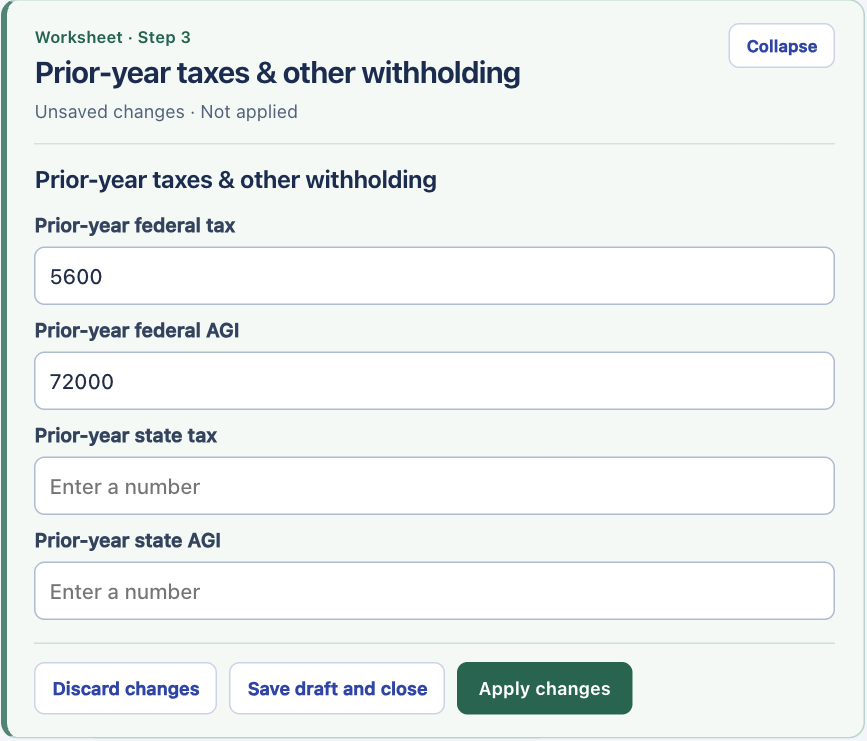
Your prior-year return shows $5,600 of federal tax and $72,000 of adjusted gross income. You are still looking for the state return.
Walkthrough
-
Open prior-year information
In Tax payments, open Prior-year taxes & other withholding. For a 2026 estimate, use the federal and state returns for 2025.
-
Copy tax and AGI separately
Enter $5,600 for federal tax and $72,000 for federal adjusted gross income. The state fields use figures from the corresponding state return.
 Open full-size image ↗
Federal and state figures have separate fields. Tax and adjusted gross income are separate amounts. -
Save your progress
Keep a draft until you have the state information. Check both sets of figures, apply the form and review the payment targets.
This guide opens in its own tab. Close it to keep working in the tab where you started; your entries stay there.