

Worked example
Your paycheck had taxes taken out, and you also sent $200 to the IRS on April 14. Have a pay stub and the IRS payment confirmation handy. You’ll enter each amount in a different place.
Walkthrough
-
Start with taxes taken out of your pay
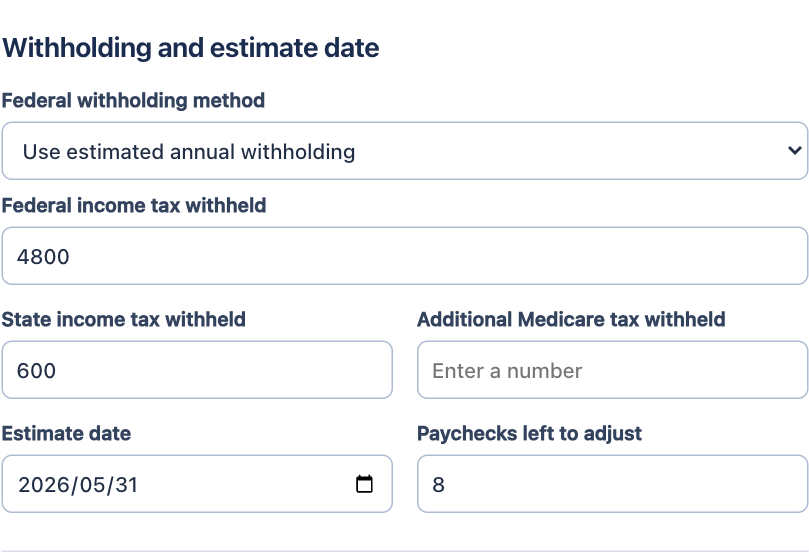
For this example, choose Use estimated annual withholding. Enter how much federal and state income tax you expect your employer to withhold for the whole year. Set Estimate date to May 31, 2026. If you track federal withholding paycheck by paycheck, choose Use withholding from individual paychecks instead.
 Open full-size image ↗
The estimate date and remaining adjustable paychecks appear with your withholding inputs. -
Add the $200 you sent to the IRS
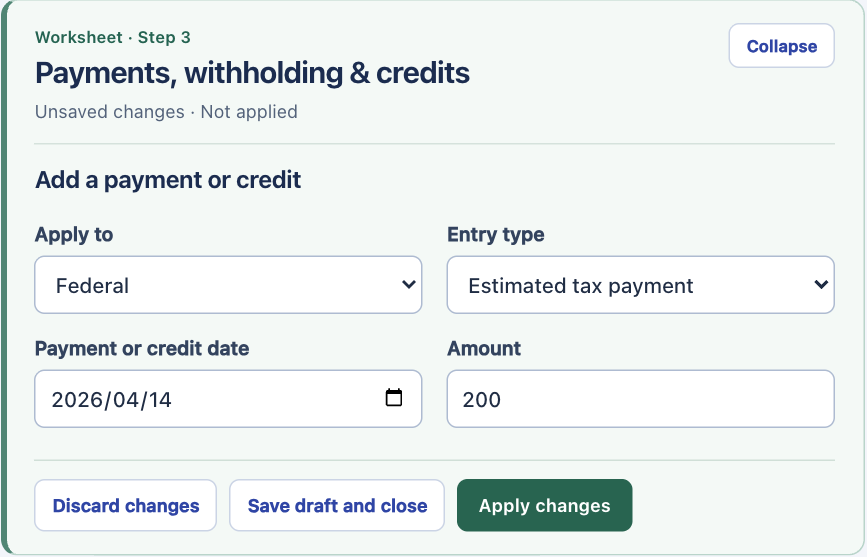
Under Payments made and planned, select Add or review payments. Choose Federal under Apply to and Estimated tax payment under Entry type. Enter April 14, 2026 and $200 from your confirmation, then select Apply changes.
 Open full-size image ↗
The record includes the tax authority, payment type, date and amount. -
Check what counts as paid
Back in Tax payments, look for the saved $200 payment. If you’ve only scheduled a future payment, choose Planned payment when recording it. It stays separate from payments made. Select View estimate to check your installment amounts.
This guide opens in its own tab. Close it to keep working in the tab where you started; your entries stay there.