

Worked example
Your federal card may show a shortfall from an earlier installment while your state card shows the next payment. Each has its own due date and status.
Walkthrough
-
Read the tax authority and due date
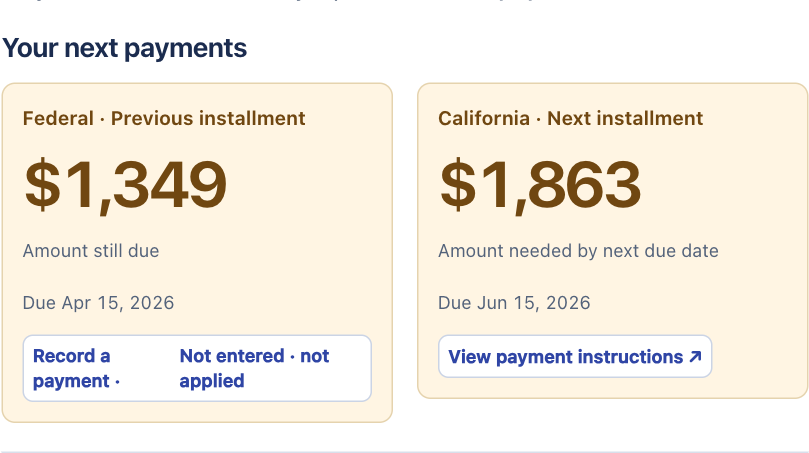
Under Your next payments, the sample shows $1,349 still due for the federal April 15 installment. The California card shows $1,863 needed by June 15. Read each amount with its own due date.
 Open full-size image ↗
The cards pair each amount with the authority and payment period it belongs to. -
Resolve a state review flag
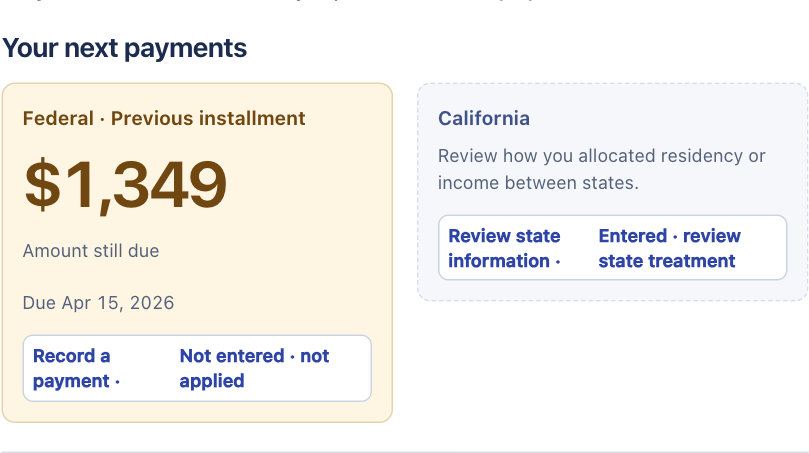
If California shows a review message, select Review state information and check where you lived and earned income. You can still read the federal result while reviewing the state allocation.
 Open full-size image ↗
The federal card keeps its result while the state card points to information that needs review. -
Open the supporting figures
Expand Annual tax and estimated balance at filing to see the full-year figures. Open Installment schedule and annualized income comparison for the cumulative payment targets. After editing an input, select Recalculate on the affected card.
-
Keep a copy
When the results are current, select Download free payment summary under Calculation details and free summary. The text file lists the estimate date and each jurisdiction’s result.
This guide opens in its own tab. Close it to keep working in the tab where you started; your entries stay there.